Sunday, November 22, 2015

Playstation 2 (Slim)


The Play Station 2 Slim version was a very decent console with a very memorable line of games. Although it was a home console it was able to solve a few issues with its previous fatter version. Because of its compact, small, and slim size it was able to use less energy and wasn't able to overheat unlike the regular Play Station 2. One great aspect of the slim version was its immense portability. The system is very lightweight, flat, and very portable. With the system you were able to play Play Station 2 games on and off line, watch DVD's, and play Play Station 1 games,

The portability factor also go rid of the Play Station 1's huge amounts of add ons needed to play on the road. This portable aspect of the console would become lost as future generations of video game consoles emerged with a change in direction. Instead of having one console that would be built both the home and for on the road, the market was divided. Now more consoles are focused on being the best all in one entertainment system, including the portable market. With the lack of portability in most of the consoles, mobile gaming was able to dominate the market with very mediocre games. Although most of the games on home consoles are great, their respective systems are too bulky and a real mess to drag around if you are going on a vacation or moving to a new location.

The Play Station 2, at the time it was one of the best systems, being able to render cinematic with good quality graphics and game control. It wasn't perfect though, the system would freeze constantly, overheat a lot, and really scratch the disks to the point where they were unplayable. The slim version however fixed the majority of problems, it was smaller and able to absorb less heat. It was smaller, more efficient, and was still able to have the same functionality of the regular Play Station 2. The creation of slimmer versions of consoles would later become a trend, thereby replacing the original version of the system entirely and allow for crucial problems to be solved. Although it can feel like it's a crutch for more monitary gain, it has been proven that the slimmer versions have been more capable of handling the same jobs as the older versions of the system as well as being more portable.

Nintendo 3DS


The Nintendo 3DS is an interesting portable device. Intended for casual video game enthusiasts, as well as a small group of friends, this system is very handy. It has a small, flat exterior that is a great leap in technology compared to its predecessors. The two screens are a bit strange to get used to at first, but very quickly become second nature. The 3DS is able to play 3DS games, older DS games, and is also compatible with the Nintendo Wii U as a controller for some games. Sadly, the older DS’s ability to play both Game Boy and Game Boy Advanced games was scrapped for the newer DS lineups.

The Nintendo 3DS uses SD cards for its memory, which is very different from both previous Nintendo consoles and its competition which simply have their own hard drives built in. The games for the 3DS are extremely small in size compared to previous systems, allowing for mass portability and small file sizes.  In a way this makes for easy storage of memory, but also allows for inconvenience for instead for not being able to either simply have a larger hard drive or the use of USB’s for even larger external storage.

There are some minor but useful functions to the 3DS that make the system unique compared to its competition. The 3D function of the system helps to really change the experience of the game. It greatly adds to both the graphics and a very different shift of perspective. The use of the stylus and touch screen allow for some very different experiences. The 3DS’s street pass function allows local gamers to be able to connect wirelessly to play together without a Wi-Fi connection, as well as send messages to each other. This greatly increases the comradery between gamers as well as competitive game play.

One small issue with the 3DS are that both the system and game updates are very compressed, which take a very long time to load. For a system that constantly needs to update on something as small as an SD card, it shouldn’t have to take as long as it does. A regular home console is understandable because it’s a very large device with a larger memory capacity.

Another minor issue is the ability to type in a friend code. There are so many number characters, and the process takes forever. Compared to other systems, where you still have to type in the characters if you are looking for a specific person and hit send, the 3DS gives a special serial number to that account. Each time you want to add a friend online you have to know the other person’s serial number and manually type it in. This process is very tedious and time consuming. Other systems allow you to find and add people near instantly if you happen to cross paths and want to join up in a game.


One last big issue are the library of games. This can also be said for both the Nintendo Wii and the Nintendo Wii U systems, there are a massive library of games that are exclusive to japan. Although this can cause a local market to thrive, it causes the worldwide market to become a barren wasteland. It isn’t like in most cases where the game being released is deemed offensive or are very difficult to translate from cultural differences, most of these games just simply remain exclusive. For a device that is built for interactivity amongst small groups of friends and online gamers, this tactic really dwindles the 3DS and the company’s reputation as a whole around the world. 

If these issues were to be fixed it would greatly increase profits for Nintendo, comradery amongst gamers, and the overall fun of using the system more often. It would allow for the system to be known better for its innovation in terms of overall design instead of letting another piece of technology become another useless novelty paperweight. 

Since the release of the 3DS there have been three other versions: the 2DS, 3DSXL, and the New 3DS. The 2DS is a flat version of the 3DS with the same capabilities with the exception of the 3D feature. This was created due to the 3D capabilities was harming children, causing them to get dizzy or sick. The 3DSXL is a very large version of the 3DS, complete with bigger screens and fatter controls. The New 3DS is a regular 3DS with very minor changes to the control pad being replaced with a newer analog stick device.

Monday, November 16, 2015


YouTube is an interface that allows users to post their own content within certain restrictions, usually for entertainment purposes.

The YouTube interface has changed dramatically over the years, some of the updates were well received and most of which had been terrible and very arbitrary. Recently however, they've decided to improve the system overall with the addition of google

Their recent addition was the implement of YouTube Red which is a ten dollar monthly subscription program that allows you to save your favorite videos and watch videos without advertisements. It also helps content creators with a small boost of paycheck.

The only main issues is that the community is the last to know about any of the updates, if the company made it publicly available it would've been greatly improved overall.

Sunday, November 15, 2015

Unreal Engine


The Unreal Engine is a great video game software that is able to be used in level and game design.

The interface for the engine is similar to the Unity engine in terms of functionality and interface. One main difference is that the time between testing the game and the menus is almost seamless. The work flows is more complex than Unity, which creates a small learning curve for new users. Other than that, and an annoying little built in readable tutorial, there really aren't any major issues. Had the tutorial been a video format, it would've made the program the best on the market.

A main feature in the engine is that there are built in blueprints that you can use straight from the beginning of launching the program. This lets you be able to quickly learn and prototype your game even faster. The rendering capabilities of the program are leagues ahead of Unity's rendering capabilities.

Overall it is more powerful than the Unity engine in terms of speed, rendering, and graphic capabilities.Since it launched the price used to be a subscription fee of $19. Just this year Unreal released the engine for free, with the exception of a 5% royalty fee of publishing games. This makes it very competative in the market now giving an alternative for the Unity Software.


Saturday, November 7, 2015

GIMP


The Gimp software is a free to use image editing software. It is in essence, supposed to be a free variation of Adobe Photoshop. It’s the only free alternative to Photoshop on the market and it had just been updated slightly as of this month.

The Gimp interface, along with a majority of the functions however are terrible. A massive problem is the amount of windows used when using the program. Instead of a typical program with a single widow split into multiple panes, Gimp uses multiple smaller windows. There are three in total: the left window is for the tool display, the middle for the work space, and the right for the layers panel. This creates clutter during work flow and would've been simpler had it just been on one window. In terms of performance some of the tools are very basic and others are very arbitrary. To flip an object for example, you click the flip object tool, and it flips the specific object. However, it only flips the object on that specific layer, this can cause problems when trying working with multiple layers. Masking an object or selection is also a lot of work in Gimp than in Photoshop. There are lots of steps to making a mask, and in Photoshop there are barely any. The tool options for specific tools are also not intuitive to use. For example, in order to change the size and opacity of the brush, there is a slider with the option to manually type in the number. However unlike other programs where you can manipulate the slider by either scrolling or typing in the number, the only way to use the slider in Gimp is to manually slide the dial across. Another strange quirk about the brush tool is the selection of brushes available. Some are very basic while others are just taking up space and would never really be used, such as the pepper brush which is literally a green pepper.  Nowadays programs are becoming accustomed to using a tablet as well as a mouse. Although Gimp is able to integrate tablet usage, there is a huge delay of lag which is terrible for getting smooth line quality.

Although the program does get the work done, some basic functions that would be simple to execute in Photoshop or other programs are done in multiple steps in Gimp or are nonexistent. The shortcuts for the most essential tools don’t take into account the user’s work flow, but rather goes by a lettering logic. For example the shortcut for the paint brush tool is the “P” key, which isn’t intuitive design, having to force the user to leave the mouse or tablet pen in order to press it when the shortcut could've been on the other side of the keyboard.

If this program was to be updated with better usability and less arbitrary functions this would be a great improvement. Having used this program for a few years, the only main improvement that has been emphasized since its initial launch is the lack of crashing. It’s hard to say whether this program is salvageable. It has some very basic functions going for it and the price is free, but compared to other programs on the market, including cheaper ones, Gimp doesn't have a whole lot of unique features. Although it has had updates over the years they have been very minor tweaks. It would definitely need a big update that incorporated overall better design and user friendliness.


Overall the program is very basic, annoying to use, and can be very arbitrary. The price is free, and it’s able to get the most basic tasks done. Gimp however isn't very user friendly in terms of both use and functionality. It isn’t going to replace any other program on the market and isn’t even close to replicating the usefulness of Adobe Photoshop.

Unity 5 Personal Edition


The Unity 5 Personal edition is an amazing tool for those who are interested in creating independent video games. There are so many aspects to this program and its community. The software is capable creating both 3D and 2D video games with an overall very high performance. The user is able to create games on every platform including portable devices and also use virtual reality devices such as the Oculus Rift.

The Unity 5 interface is very user friendly. The main window is divided into four main sections. The middle section is your scene workstation where you can edit and customize levels and other assets as well as test out the game. The left section is the hierarchy, this area lists where every object is in the game and their specific groupings be it textures, animations, sound effects etc. The bottom section lists all of your favorite materials and assets as well as lets you check the coding during testing. The right section of the window lets you manipulate selected objects. The top section of the window lets you play, pause, and stop playing your game and has the tool bar. The program has a huge catalog of assets from their store, some of which are either free to use or a real bargain to purchase. In fact people have actually made a decent living just creating assets to sell on the store. Unity also comes with a wide array of packages of various tools and effects that you can use in your games. For example most beginners want to create a first person shooting video game but either aren't sure exactly how or just want to hit the ground running. They've developed an entire control kit to allow for very easy use and customization for those who really want to quickly want to make their next game or prototype. The tutorials on Unity’s website, along with the overall community, are great to use if you have the time and are very straight forward to learn. This is great considering most of the tutorials found on YouTube are usually outdated or very slow in the making.

The rendering engine, particle system, shading system, and physics system in Unity 5 are far superior to its predecessor and most of the competition on the market with perhaps the exception of the Unreal Engine. It’s very similar to the Unreal Engine, but the quality is just slightly better on the rendering aspect. The work flow of Unity 5 is great and very simple to get a hang of when creating levels and terrain. It is also compatible with other various programs such as Maya and Blender.

The flaws for Unity are very few and are very minor. As helpful as the tutorials are on their website, it’s all about the Unity Engine and their tools. Most people who want to jump into making a video game usually have an idea of what genre they want to work on. Because of this, you’ll have to turn to YouTube. YouTube’s tutorials are useful in principle, but are mostly very out of date and low quality. Although there are weekly tutorials from some of the best users and creators of the program, if Unity had specific series on some of the types of games that could be made, or even very popular genres, it would greatly increase user interest. Another suggestion would be to add 3D modeling capabilities into the program. Although you can create different terrain, weather, effects, shading textures, particle physics, and import other assets, it would seem simple enough to be able to create basic assets as well in theory.


There are two versions of the software, a more recent personal version and a professional version. Both of these versions have the same capabilities. The professional version comes with a few more tool kits, analytics tracking capabilities, cloud saving, prioritized bug handling, and beta access. Overall the program has quickly evolved since its initial launch. The personal edition is free to use and is capable of publishing on every platform. The professional version is a requirement when the creator retains one hundred thousand dollars in profit, and is a team license with the aforementioned capabilities. The professional version isn’t strikingly different than the free version. Overall the program is great for what it is, a very high performing level and game engine. 

Sunday, November 1, 2015

Maya (2015)


Autodesk’s Maya software is a program for people who are interested in creating animation and CG models. This program is the current industry standard of video game, film, and design companies that are involved with computer generated images.

The Maya interface is very intuitive in its design. It’s easy to use for a beginner, the layout is simple and organized, and it’s feels great to work with for the most part. When the program boots up you’re automatically greeted with a blank canvas to work with, and the program also allows for various work flows. The program allows you to create a 3D model, add textures, add a wide range of effects, animate the model, see the finalized product, and easily import to other software with relative ease. Building and animating in the program is simplified when starting and also allows for more complex tools and geometry as your skill progresses. Overall it feels great and, depending on the process, can be very rewarding to see the finalized product.

There are some drastic downsides for the program however. Firstly the price is insane for the standard program, which is approximately three to five thousand dollars for a perpetual license. There is a choice of paying for a subscription for the program, which is a somewhat cheaper price. There is also the recent alternative program Maya LT which is a cheaper version of the Maya software for eight hundred dollars, however it doesn’t include very drastically important tools and functions of the original Maya software. The built in renderer for Maya is terrible compared to other programs and third party software. There are also lots of updates to the Maya software that have had major changes which have caused multiple problems: entirely lost functions that were very useful and convenient to use, disrupting work flow or making it tedious or too complex, and causing the program to crash more frequently from using a very basic function. Lastly, it can be extremely easy to make a mistake and not know what you did or how to fix it. This can also effect the work flow and be permanent to the program until it’s fixed.


Overall, the program is great to use and very fun. It’s simple to get a hang of, and most of the tutorials, including the outdated ones can still be put to use in principle. There is the choice of an annual subscription to the program. If the creators of the software were to listen to the community about the massive amount of complaints to their recent changes and dramatically reduce the price, there would be many benefits for CGI artists along with independent developers. There is a way to get it as a student, but the license is only three years.

Blender 3D


Blender 3D is an interesting program. It’s a free open source program intended for anyone trying to make animations, animated movies, 3D models, video games, and other projects involving computer generated images. There have been some good things to come out of Blender’s community and overall the program has a lot of potential.
           
The interface for blender however, is one of the worst interfaces of all time. Although the program allows for work flow customization, it is not intuitive design. There is a high probability that a beginner will accidentally open other windows and not know how to get them to close or go away. There is a massive learning curve when starting to use the program. Overall the controls are awkward. Basic functions are made way too complex. In order to switch between points of views you have to use the number pad. In order to select objects you have to right click them, this is goes against every intuitive design for just about every CGI program ever created. Once an object is selected and you want to place it somewhere in space you have to hold left click and drag it where you want it, and then immediately left click it again to place the object. The controls are also really awkward to use for modeling a basic mesh of polygons. There are too many tools and shortcuts to memorize.


The program is free to use, free in cost, and has a lot of useful tools available. Sadly, all of the tutorials, including most of the basics from CG cookie, their official site for tutorials have an annual fee for their courses. That’s to be expected, however with the extremely high learning curve they should at least make the basics free. If you try to find an alternative way of learning the program, most of YouTube’s selection of tutorials are of very low quality and may also be drastically out of date. Although the program is functional and there have been many new updates added to the program, overall it’s almost unusable for a beginner and very awkward for some CGI artists. This is a real shame considering its high potential and very productive community, which runs the program’s current design updates.

Sunday, October 25, 2015

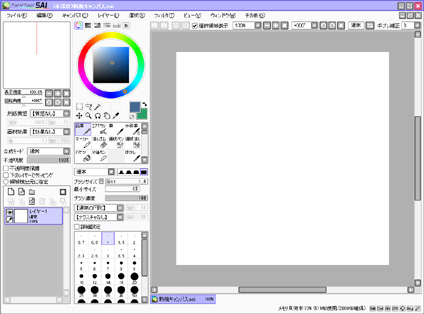
Paint Tool SAI


The computer program Paint Tool Sai is a very well renowned program amongst various artists and most artists just starting out on Deviant art.com. It’s essentially an image manipulative program with a cost of approximately sixty US dollars, depending on the currency rate compared to the Japanese Yen. It’s a very lightweight program with some basic, yet very unique and useful tools. It’s not a jack of all trades, but it is very good at what it does, and the results can be amazing if used well.
            Overall this program is rather simple in terms of functionality and overall ease of use. It’s essentially built for drawing tablets and runs rather smoothly. The tools such as watercolor, brush, crayon, and marker actually give the impression of the physical tool. The program is very flexible in terms of customization: changing the placement of the tools within the window and adding various brushes and color swatches.
            
            There are really only two minor issues with the programs overall function. One factor that is a disappointment is that there isn’t a tool for making basic shapes such as a square or ellipse. Although there are various tools for making selections, including a magic wand tool, these basic tools would greatly reduce the time during work flow. Another issue is some of the translations between the Japanese language and English on both the Paint Tool Sai program and the official website. The English itself is able to give the basic information, but some of the grammatical issues still need some work, especially since the program is such a useful tool. Also on rare occasions the program can be buggy at times, it may reject scans of a traditionally drawn object or simply not respond. It is unclear if these issues are directly related to the program.

           
            Paint Tool Sai is a very useful lightweight tool for artists. The program has been compatible since Windows 2000 and has overall been unchanged. It has a small but very useful variety of pen types and a very wide variety of color palettes. Since the development of the program, there hasn’t been much change with the exception of translating the language from Japanese to English. As of October 19, 2015 there is now a beta in testing for a new update to Paint Tool Sai Version 2. There isn’t a translation in English as of yet or a release date since the developer is only one person. This demo version already allows for the creation of circles, three point perspective rulers, and is also open to requests.

Wacom's Intuos 5 Pro tablet


            The Wacom Intuos 5 Pro computer tablet is a decently designed tablet. The intent of the tablet is to give artists and designers an alternative to using a keyboard and mouse. This alternative allows for much smoother line work and overall quicker design. Using a mouse can be rather clunky and it isn't nearly as accurate enough for smooth line control.

The tablet comes with a USB plug, stylus, a tablet specific mouse, and pen holder. Encased in the holder are three colored attachments, a pinching tool, and a multitude of spare nibs for the stylus. The colored attachments used to stylize the pen as well as label it if you have other Wacom stylus. It’s able to precisely measure the amount of pressure placed on the pen to the tablet’s surface. On the left side of the tablet is the interface which comprises of eight programmable buttons and four programmable LED touch panels in the center.

The tablet and stylus do have some minor flaws to consider however. One of the main problems with the device is that you are still dependent on a computer screen in order to watch what you’re drawing. It can be a real pain having to look back and forth between making sure the pen is on the tablet and checking where you made your mark on the screen. This can cause a very slow adaptation when consistently using a tablet instead of just simply jumping in and allowing creativity to flow smoothly. It creates a very steep learning curve for first time users. Another minor flaw is when you have to replace the nib of the pen with the pinching tool. The basic idea of the spare nibs is that they eventually erode during use and that you can simply pull it out and replace it quickly. However, pulling out a fully eroded nib is impossible due to the amount of the nib that you need to grab onto when using the pinching tool in order to pull it out. This means that in the long run, the nibs can’t be used for very long and must be replaced very frequently. It’s rather strange, seeing how long a nib is when you pull it out of the pen compared to the amount that is able to be used. The last flaw is that the tablet comes with a mouse. The mouse is functional and responsive to the tablet, however it is rather odd. The idea of owning a tablet is that it is to replace the keyboard and mouse for artistic work and accuracy, so the fact that it has a mouse is out of place and unnecessary.

The Intuos 5 tablet and stylus is overall quite user friendly and is surprisingly easy to customize. Had they gone with a mechanical pencil approach to filling the pen with nibs they would definitely last a lot longer in the long run. The mouse should’ve been replaced with either a spare stylus or even with the wireless adapter for the tablet. Since the development of Wacom’s Intuos 5, there have been many other tablets and accessories: the Cintique and the Cintique Companion 2 all of also feel more structurally stable compared to their earlier counterparts.


The Cintique is leagues ahead of the Intuos 5. The Critique is a desktop monitor and drawing tablet combination that allows the user to see what they’re working on at high definition. Like the predecessors to Wacom’s tablets it has the same basic functions of all o their tablets. It has even greater accuracy compared to the other tablets and overall better functionality. A major downside of the older Cintiques are that the colors of the display is terrible, however this has been fixed with later Cintiques and the Companion series. The Companion 2 is a more portable version of the Cintique. It’s a very portable and very efficient at both professional work and casual use. The companion is also a stand -alone tablet, however there is a minor issue of it not coming with keyboard.

Sunday, October 18, 2015

The Blue Yeti Microphone


The Blue Yeti microphone is a great sounding condenser microphone. Intended for those who want to sound as close as possible to professional studio grade microphones, the Blue Yeti is the best sounding microphone that isn’t going to cost an arm and a leg. The Blue Yeti is a USB powered condenser microphone. This microphone is typically used for people who are starting out on YouTube doing “let’s play” videos in which a person commentates on video gameplay and through the commentary gives a feeling of comradery towards the viewer. It is also greatly used for people who are just starting out with music, voice acting, and podcasts. Because the microphone is relatively small and comes with a removable desktop stand, it also becomes a great portable microphone.

The exterior of the Blue Yeti gives a very professional look with its grey paintjob and desktop stand. On the front of the microphone, indicated by the “blue” logo, there is the mute button and the headphone volume knob. On the bottom of the microphone there is the USB power import, a 3.5mm headphone port, and a screw if you want to mount the microphone on standard microphone stand. On the back is knob for the gain control and another small knob for switching the sound pattern modes. It has four modes that have very specific uses when recording audio. There is stereo setting, which allows audio to be recorded from the front and sides of the microphone, allowing refracted sound to bounce from behind. The second is cardioid, this allows sound to be recorded from the front of the microphone. The third is omnidirectional, which allows for sound to be recorded from all sides of the microphone including the back. The last pattern is bidirectional, which allows sound to be captured from the front and the back of the microphone to be recorded. Overall the Blue Yeti microphone is very user friendly, even the user manual is easy to use, and even gives advice for getting the best audio quality possible.

The only two small flaws with the microphone are that it is very sensitive to the sound and the desktop stand’s rubber bumpers tend be vibrate, even when placed on a rubber mousepad for support. The sensitivity of the microphone is a bit of a double edged sword, on the one hand you need that sensitivity and have control over the gain’s sensitivity. On the other hand, if the environment you have isn’t ideal, without any noise in the background, the microphone will pick it up.

The solution to the sensitivity would be to simply get padding for the environment and to lower the gain as much as possible without losing the essential audio for your audio track. The vibration of the mount can easily be solved by removing the desktop mount from the microphone and screwing the microphone into a proper microphone stand or boom mic arm.


Since the launch of the Blue Yeti microphone there have been four other microphones. There is the Blue Snowball microphone, a cheaper, somewhat lower quality microphone used for those on a budget. There is the Blue Yeti Blackout, which is a black version of the original Blue Yeti with a foam bottom instead of a rubber. The Blue Snowflake is a very tiny microphone which is meant to be extremely portable and have a decent audio quality. Lastly, the Blue Yeti Pro, has the same capabilities of the original Blue Yeti as well as the added feature of a socket that allows you to use external recording equipment instead of just reverting to software which can cause a delay while listening to the audio live as it is being recorded. 

The I-tunes interface


I-tunes, one of the most used software systems on both the mobile and computer markets. Used primarily as a software for listening to music, the I-tunes software has had numerous updates to incorporate visual media such as movies and television in an effort to keep up with today’s portable media all-in-one market. Since these updates have been implemented and have hypothetically improved the overall use of the software, the interface and functionality has actually gotten worse with each update.

The interface, organization, and some functions, for I-tunes are implemented terribly. Upon first opening the program on the computer, the software automatically synchronizes all of your music to the main window. This function is great unless you have a lot of media, which causes massive clutter due to the system’s way of organizing data. The main window of the software is divided into, for our purposes, three main sections. The first section is the very top of the window, where you have the basic controls: play, pause, skip forward or backward, and volume. Also on the first section is your I-tunes account log in, and a search tab. The second section is the navigation of the software: this is where you can view your music, podcasts, books, television programs, your play lists, recommended media, and the I-tunes store. The last section is where you’re able to view the media, primarily music. This last section is slightly divided up into two subsections: the most recently added music and a complete view of every album of music. Each individual album is represented with either the album’s cover art or the apple logo, indicating there isn’t cover art for that audio file. Because the window is essentially numerous pictures of cover art depending on the amount of media you have, it becomes very overwhelming to look at as well as a pain to navigate. Although there are different ways of viewing the media, it’s still very cluttered depending on the type of media.

The way audio, along with other media, is organized on a computer is very different than on a media player. When you burn a CD onto your computer, the computer is able to organize the audio packets of data under a folder that you can rename after the CD’s title. The data’s order is unchanged from the original order of the CD in a list format. From that folder or multiple folders, you can open up a media player and can create play lists of select audio. It’s simple, clean, and organized.

 A primarily major flaw is the organization of audio on I-tunes, along with all media players. The way that media players organize music is by the artist’s name, followed by album name, relative genre, and lastly the year. This is logical on a surface level, however, not every album is created by a single artist. For some albums, they can be a combination of a single artist and an orchestra, or even be a collaboration between multiple artists. These albums would then either be organized as the artist’s name followed by the name of the collaborator, or more commonly, label the audio track’s artist as “various artists”. When the album is comprised of multiple tracks done by “various artists”, this drastically changes the way that the album is organized. Because the default organization is by the “artist”, this causes the media player to split up the audio from the CD into multiple parts, dividing each track by its specific artists, and then organizing those tracks as their own albums. This in turn, causes the computer to convert one CD into multiple groups. Because these groups now exist, the original CD’s music files are either duplicated within the multiple groups and are unorganized from the original CD’s organization.

Another huge flaw for I-tunes, are foreign albums. For foreign albums, such as Japanese animation soundtracks, which have the same organizational format as a regular CD, may have different written characters and or combinations of English characters. Because these characters are different, the computer is usually unable to recognize them, replacing them with boxes. These boxes in turn make it very difficult to find a specific album if there are multiple foreign albums or artists. When both of these major flaws are considered, the organization of music and the replacing of characters into illegible boxes, it makes the software virtually unusable for a huge range of music worldwide.

Strangely, the functionality of the menu for podcasts on I-tunes are relatively good, although there could still be improvements. The podcasts, are organized by the name of the podcast and episodes are listed from the newest to the first episode by default. The main issue with the podcasts however is you have to manually download every episode, even if subscribed. If you are subscribed you are automatically updated on when the latest episode is available to download from the podcast’s feed, this feed is a library of every episode of a podcast. However, because most podcasts have at least one hundred episodes or more, having to manually scroll through the feed to download them becomes a chore. Although you can set the system to automatically download episodes, it will only download the newest episode on the feed.


All of these issues can easily be solved on a single update. The software could easily be updated to recognize foreign characters, especially considering that apple products tend to be manufactured on foreign land anyway. This would allow for both the music and the software to be easier to use and not be cluttered as well as a larger variety of music storage. There should be an option to allow music organization by showing a list of the album name, followed by the artist. This would allow for both the mobile and computer versions of I-tunes to flow smoother when selecting music and ease of use. The podcast’s subscription button should simply allow for all episodes of the podcast to be downloaded automatically in the background as opposed to simply notifying you of the latest release. This would allow for more time for listeners to either continue listening to their favorite podcast or give others a shot. 

Sunday, October 11, 2015

The Everio Camcorder


The JVC GZ-R30BU Everio camcorder is a great camera. Intended for small films and Internet videos, this camcorder is very useful. It’s compact enough to where it can fit in your pocket and allows you to take photos and videos without you having to worry about the quality, as opposed to a smart phone or other lower quality cameras. This camcorder was intended to be the best camcorder, focusing on tackling very common issues for film makers, video quality and weather resistance. The camera can be used anywhere, and is mostly intended for outdoor use.  

This camcorder is very weather resistant, able to shoot at a rate of 2K (1080p) with a battery life of four and a half hours, and has a very long dynamic zoom feature. There is also the ability to do time-lapsed videos as well as the ability to cut out the wind noise and camera shakes.  The device itself is very easy to use, just point and shoot. It comes with three types of cables: an RCA cable, a charger and adapter, and a USB cable. The RCA cable allows you to sync the camera to your television to watch recordings in HD. The USB syncs the camera to the computer where you can also edit your clips and keep a record of when you filmed your shots.

Although the camera itself is very simple in terms of use, the software the camera comes with is a real pain in terms of navigation. The entire interface is confusing considering they split the software into two programs, both of which have their own flaws. One half of the software allows you to select photos and video clips while the other half keeps a calendar of when you filmed those clips. The first half of the program seems simple to use in terms of concept, but the actual process is time consuming and just isn’t very user friendly. Most of the time it doesn’t even let you select the film clip. The second half of the program simply keeps track of when you last filmed. As useful as this would be for a serious film maker, the average person would most likely find this feature to be pointless. Although the first half of the software does help somewhat when watching the clips on an HD television, that’s all it’s really good for. Another issue is that the camera itself, although it has a good battery life, is unable to shoot while it’s charging. The built in microphone on the camera is also of low quality.


Although the software needs some major work, the camera itself is rather amazing. It’s able to resist shock damage, is waterproof, ice proof, and also dust resistant. Because it’s also able to capture everything at 1080p you don’t have to worry about having any low quality photos or video quality dropping. Overall the camera is very simple in design and versatile in terms of potential use. 

The Astro A 40 Gaming Headset


The Astro A40 gaming headset is a pair of headphones, a microphone, and a sound mixer. Intended for video game enthusiasts, this headset and sound mixer combination is supposed to give the user the greatest sound quality for their entertainment needs. These tend to be used in action intense game series such as Call of Duty and Halo. The sound quality in a video game can be used to both immerse the player as well as give a tactical advantage in the game. This tactical advantage can be through working cooperatively, talking privately with a small team, or hearing the footsteps of an enemy team member start to run towards you. The Astro series headsets were created in competition with other companies such as Turtle Beach, Kraken, and Plantronics.

The A40 headset design is very stylized, with a the majority of it in a grey scale color scheme which creates a sharp contrast with the bright orange highlights of the spring-like structures within the headset’s adjustable speakers. The outside of the speakers contain plates which are attached by magnets, these plates cover the inputs for the microphone. The plates are removable and the microphone itself is able to also be removed and swapped to either side of the headset. The magnetic plates are also swappable with other stylized designed plates which can be found on the Astro website. This gives the user a great amount of diversity in terms of preferred play style and color.

The sound mixer also uses the same color palette of the headset. It’s very small and compact. The shape, button, and dial placement on the mixer give the appearance of it being a very professional piece of equipment. The dials for the main volume, game and voice chat are very smooth and feel great to control.

Compared to a similarly designed headset, the Plantronics Rig Xbox Headset (white), the A40 headset and mixer are vastly superior. With the Plantronics headset, you’re able to take phone calls or listen to music through your mobile device while simultaneously playing a video game. Although this functioned somewhat well, the master volume controls had to be constantly adjusted due to the huge imbalance and poor audio quality. The four wires that the Plantronics headset came with, also including the extra microphone wire, felt very flimsy and the entire setup was a huge mess. The Astro A40’s on the other hand, even with the four wires and compacted sound mixer takes up less time to set up and it doesn’t seem nearly as flimsy or messy. The overall sound quality of the A40 is way better than the Plantronics headset, even when used on the computer without the sound mixer.

The only real flaw with the A40 model headset is that it requires the purchase of an extra specialized chord in order for it to be hooked up to the Xbox One which you can get exclusively at the Astro website. Although it’s a cheap price for the wire, it would’ve been best if Astro had just thrown it in the initial package. There is an Astro A40 model available specifically suited for the Xbox One console that comes with a built in controller headset adapter attached to the end of the headset. However buying an A40 model with a sound mixer and specialized chord allows for a greater variety of use for multiple consoles.


There are four models of Astro gaming headsets, the A30, the A38, the A40, and the A50. The A38 model is a Blue tooth, wireless headset made for PC, mobile devices, and tablets. It’s also built to cancel any background noise and fit on the ear. The A30 also fits on the ears and has a removable microphone with Dolby 7.1 sound quality. The A40 model fits over the ears, has the same audio quality, and is compatible with current and previous generation game consoles. It also has a removable and swappable microphone. The A50 model fits over the ears, is wireless with the same audio quality, and is automatically muted when positioned vertically on the headset. The microphone is not removable however. Overall these models have very different purposes. The A38 model is intended to be used for people who tend to travel due to it being exclusive to mobile devices. The A30 is a cheaper, basic yet versatile video game headset. The A40 model is a more professional version of the A30 with a bigger emphasis on live streaming game play and audio balance. The A50 model is essentially a wireless version of the A40 with a permanent microphone, this gives a less is more approach of design. It’s able to be used for a total of five hours on a charge, which is decent for gaming and allows the player to decide to take a break in between charging. 

Saturday, October 3, 2015


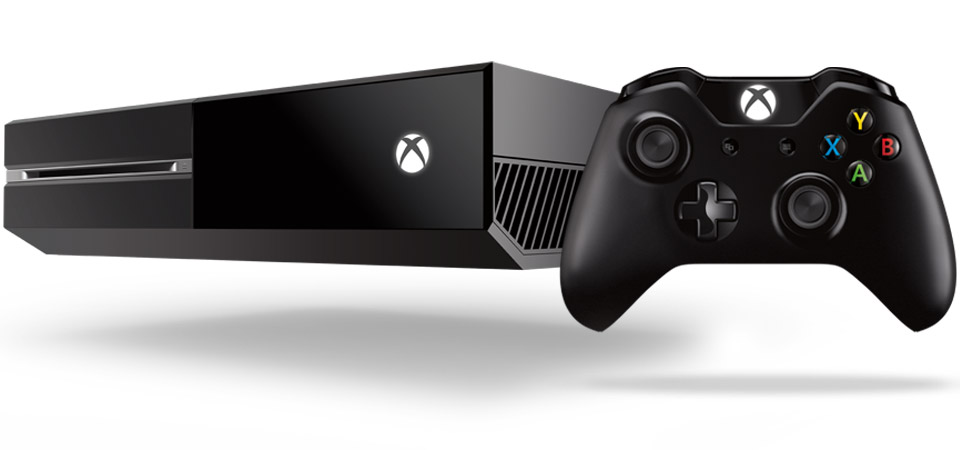
Microsoft’s Xbox One, one of the strangest additions to the Xbox family thus far, with its massive software and hardware problems and exclusive game titles that seem mediocre at first glance. The game system has had numerous software updates throughout its span, some for the better, and others that should’ve just came with the initial launch. When the Xbox One was released in November of 2013, it was a large piece of hardware that seemed more like a VCR than a game console. The idea for the console was to make it an all in one home entertainment system. Upon near release there had already been speculation of rumors that the system would require the addition of the Microsoft Kinect, a product that wasn’t of huge demand, and that the system would always be on when you were tracked through the Kinect. There was also speculation that the system would have larger memory than what was originally released. Lastly there was the issue of what was to become of the recent hacking that had taken place on both Microsoft and Sony’s platforms. Since then, some of these issues have been dealt with, while others are still in progress. The hacking that had undone lots of system errors including privatized chat amongst friends and between online profiles has slowly been improved for some profiles and is still in progress. Thankfully the Kinect was later removed from its initial launch and has since then become merely an option rather than a requirement. The system’s memory capacity is lower than what was to be speculated during launch, however there is an external memory card add on that grants a terabyte of extra storage, which you will definitely need because of how the system stores data of its games.

The system itself is larger than its two predecessors as well as polygonal and is sleeker than the Xbox 360 slim edition. They design of the controller compared to the Xbox 360’s is overall improved with a sleek and more responsive speed on the trigger buttons, albeit the battery life could arguably have declined. It has a more natural grip than the 360’s and it feels better in general to hold. The Xbox One’s on screen dashboard is similar to Windows 8. In terms of capabilities the Xbox One surpasses the Xbox 360. Downloading digital content was a huge nuisance on the Xbox 360, however on the Xbox One, you’re able to download and play the game simultaneously as well as use combinations of applications such as Netflix and other social media. You can also snap two screens in order to use two applications at the same time as well, instead of the seamless jumping from one screen to the next. The system also has the ability to record gameplay clips of thirty seconds to a minute of footage and pictures to its DVR to share with friends through your profile’s online feed. Because the system is marketed as an all in one home entertainment platform, there are various applications and updates available including Blu-ray player and I-heart radio. You can also customize the color of the dashboard and along with a future update, be able to play games across both the Xbox One and Windows 10 players on the PC. This cross-platforming concept, although not entirely new, has yet to become fully implemented a system in video game history and will greatly influence the market and industry as a whole in terms of game design and experimentation.

            The Xbox One however isn’t perfect, even with the most recent of updates and future announcements. Since the hacking scandal, some of the perpetrators had been dealt with and are in the process of fixing what they had broken this, this however has been a painstakingly slow process for what would seem to be a simple fix, especially since it’s the same people who caused the issue to begin with. Also the amount of memory of the Xbox One is very small in comparison to the amount of storage these games come with, prompting the inevitability to eventually purchase the terabyte addition instead of uninstalling one of your favorite games because an application needs an extra update. Speaking of updates, the Xbox One is finally going to get backwards compatibility for Xbox 360 games. However, this will be from a handpicked list from the Xbox Community that will grow exponentially for the next few years. This update albeit great, should’ve been implemented at launch when it was a great concern for new users. It also should have backwards compatibility for the entire library of games, especially since they are going to be using an emulator of the Xbox 360’s operating system. The Xbox 360 also had the same issue of only being somewhat compatible for its previous system’s games and there isn’t really an excuse for it. Comparing to the PlayStation 2 which was released with full backwards compatibility back in 2000. Microsoft would’ve been able to gain a much greater audience had this issue been dealt with. The bulkiness of the Xbox One is a rather big deal, it takes up a lot of room, and it’s not recommended to be stacked on due to the placement of the ventilation plates on the system. This could’ve been fixed rather effectively had they gone with a slimmer, flatter approach. Comparing to the PlayStation 2 slim version, this system was not only leagues smaller than original design of the PlayStation 2, but it was also greatly reduced in depth, making it the most compact portable home console to date. It had the same capabilities, was able to connect to the internet, play both video games and DVD’s, as well as save content, and with an add-on able to play with up to four people. The portability aspect is something that has been lost for modern videogames for quite some time which is strange, especially in an era where computers and phones have become flatter and more compact. The Xbox One’s Windows 8 operating system is also a challenge for new users to navigate and it’s very tedious to get tasks done. For example, redeeming an online membership code is very time consuming without the Kinect, having to type in the twenty five character and number combination manually without a keyboard pad. There is also a small inconvenience on the Xbox One’s controller is the need for an adapter for a 3.5mm headset along with a 2.5mm cable. Although it’s included with the system, the Xbox 360’s controller just came with a port for a 2.5mm headset. This means that whenever you get a 3.5mm headset for your Xbox One, you need to make sure that both the port and adapter are also functional in order to use the headset. Albeit the adapter’s design is very handy, the 2.5mm cord however could’ve been improved through simply adding an additional port on the controller as a secondary option. In terms of exclusive game titles, there really aren’t that many in the lineup that aren’t already on either the previous console or on the competition.

            Overall the system is a mix of flawed and decent design. If looked at objectively they did manage to make a decent home entertainment system, with a library of games, apps, social media, and the ability to use it all at once without interrupting the downloads of memory for each one. This is still better than the previous system by far, however there are too many aspects that desperately need attention if Microsoft still wants to continue making game consoles. Hopefully as future updates are released, the system might have a chance to stay above water. If you are considering to purchase an Xbox One, it would be best to wait until they release an improved and possibly slimmer version. The system is borderline average in terms of functionality and definitely needs improvement towards online and software capabilities.

The Elgato Game Capture HD


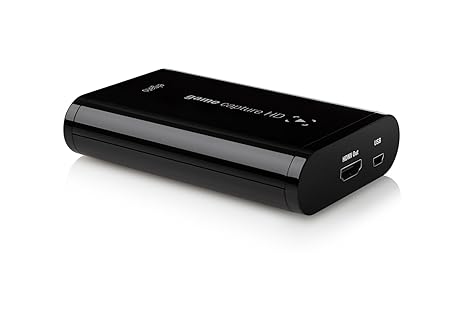
Since its release in 2012, the Elgato Game Capture HD has become a staple of video game capturing technology and the Elgato brand has yet to be surpassed. It’s a portable capture card that enables the user to upload game play footage onto services such as YouTube or Twitch. This product is intended for video game enthusiasts who are interested in reviewing video games or creating “let’s play” videos, in which a person narrates over game play footage about real world events, their initial reactions to the game, or for other entertainment purposes in order to create a comradery between them and the viewer. The Elgato Game Capture HD functions by capturing the footage and audio from the video game console and sending it to both the television and computer. The software allows the footage to be captured at thirty frames per second at 1080p quality depending on what game and console is being used. Then, the footage can be cut down and edited in the free software for the device. The best part of the Elgato Game Capture HD is that it’s able to capture both old and current generation consoles as well as computer gaming.

In terms of exterior design, the capture card is very compact and sleek, able to fit into the palm of your hand. The typeface and contrast of black and white lettering gives the device a luxury quality look to it. The labels for the input and output plugs for the cables are also legible. The software has a very user friendly interface, with a giant red recording button on the bottom left corner of the screen, the volume controls on the right side, along with the edit mode button and system settings.

Overall, this product is great due to its ease of use, great video quality, its continuous recording and variety of consoles and games that it can be used with. The only flaws with the Elgato Game Capture HD are that the footage is delayed when being captured from the television to the computer by a couple of seconds, and that it is unable to capture group “party” chat amongst friends online who may be playing in different servers or different games entirely. This problem seems to be only for current generation consoles such as Xbox One, without the Microsoft Kinect addition and PlayStation 4 and not for last generation such as Xbox 360 and PlayStation 3. There are a couple of tutorials on YouTube however that have solved this issue but the methods involve a few more wires and may cause some audio feedback during the capturing process and or with the party chat itself. These tutorials however useful, they are of low quality and are in desperate need of an update. Had this chat issue been improved in future iterations of the capture card this product would be absolutely perfect, but for what it is, the device is definitely worth the investment  as a starting point for gamers who want to just get started on making videos.

Since production, Elgato has updated the software to become more user friendly, including features such as live streaming, and the ability to post videos onto various devices and social media. Elgato has also created two newer iterations of their game capturing devices. They created the Elgato Game Capture HD 60, another portable device with the same capabilities as the predecessor, with the exception that the HD 60 is able to only work for current systems and is able to capture footage at a much faster rate of sixty framers per second. This was created in response to modern games putting more emphasis on graphic capabilities and online connections being able to flow more smoothly. Also just two weeks ago, Elgato introduced the Game Capture HD 60 Pro, a non-portable capture card with the same capabilities as the HD 60 along with the added feature of instantly capturing the footage without delays unlike its predecessors. This was intended for enthusiasts who decided to create their own computers. So if you are interested in sharing video game play with your friends, get an Elgato Game Capture card today.