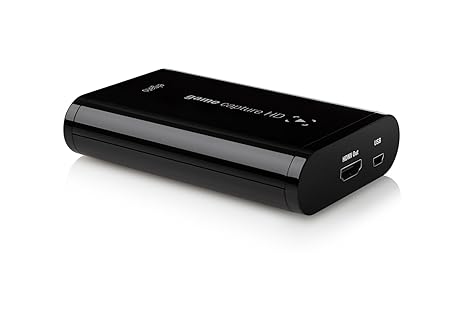
Since its release in
2012, the Elgato Game Capture HD has become a staple of video game capturing
technology and the Elgato brand has yet to be surpassed. It’s a portable
capture card that enables the user to upload game play footage onto services
such as YouTube or Twitch. This product is intended for video game enthusiasts
who are interested in reviewing video games or creating “let’s play” videos, in
which a person narrates over game play footage about real world events, their
initial reactions to the game, or for other entertainment purposes in order to
create a comradery between them and the viewer. The Elgato Game Capture HD
functions by capturing the footage and audio from the video game console and
sending it to both the television and computer. The software allows the footage
to be captured at thirty frames per second at 1080p quality depending on what game and console
is being used. Then, the footage can be cut down and edited in the free
software for the device. The best part of the Elgato Game Capture HD is that
it’s able to capture both old and current generation consoles as well as
computer gaming.
In terms of exterior
design, the capture card is very compact and sleek, able to fit into the palm
of your hand. The typeface and contrast of black and white lettering gives the
device a luxury quality look to it. The labels for the input and output plugs for the cables are also legible. The software has a very user friendly
interface, with a giant red recording button on the bottom left corner of the
screen, the volume controls on the right side, along with the edit mode button
and system settings.
Overall, this product is great due to its ease of use, great video quality, its continuous recording and variety of consoles and games that it can be used with. The only flaws with the
Elgato Game Capture HD are that the footage is delayed when being captured from
the television to the computer by a couple of seconds, and that it is unable to
capture group “party” chat amongst friends online who may be playing in
different servers or different games entirely. This problem seems to be only
for current generation consoles such as Xbox One, without the Microsoft Kinect
addition and PlayStation 4 and not for last generation such as Xbox 360 and
PlayStation 3. There are a couple of tutorials on YouTube however that have
solved this issue but the methods involve a few more wires and may cause some
audio feedback during the capturing process and or with the party chat itself.
These tutorials however useful, they are of low quality and are in desperate
need of an update. Had this chat issue been improved in future iterations of
the capture card this product would be absolutely perfect, but for what it is,
the device is definitely worth the investment as a starting point for gamers who want to
just get started on making videos.
Since production, Elgato
has updated the software to become more user friendly, including features such
as live streaming, and the ability to post videos onto various devices and
social media. Elgato has also created two newer iterations of their game
capturing devices. They created the Elgato Game Capture HD 60, another portable
device with the same capabilities as the predecessor, with the exception that
the HD 60 is able to only work for current systems and is able to capture
footage at a much faster rate of sixty framers per second. This was created in
response to modern games putting more emphasis on graphic capabilities and
online connections being able to flow more smoothly. Also just two weeks ago,
Elgato introduced the Game Capture HD 60 Pro, a non-portable capture card with
the same capabilities as the HD 60 along with the added feature of instantly
capturing the footage without delays unlike its predecessors. This was intended
for enthusiasts who decided to create their own computers. So if you are
interested in sharing video game play with your friends, get an Elgato Game
Capture card today.

No comments:
Post a Comment