I-tunes, one of the most
used software systems on both the mobile and computer markets. Used primarily
as a software for listening to music, the I-tunes software has had numerous
updates to incorporate visual media such as movies and television in an effort
to keep up with today’s portable media all-in-one market. Since these updates
have been implemented and have hypothetically improved the overall use of the
software, the interface and functionality has actually gotten worse with each
update.
The interface, organization,
and some functions, for I-tunes are implemented terribly. Upon first opening
the program on the computer, the software automatically synchronizes all of
your music to the main window. This function is great unless you have a lot of
media, which causes massive clutter due to the system’s way of organizing data.
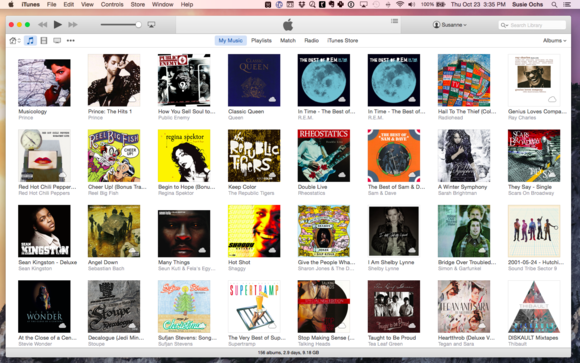
The main window of the software is divided into, for our purposes, three main sections.
The first section is the very top of the window, where you have the basic controls:
play, pause, skip forward or backward, and volume. Also on the first section is
your I-tunes account log in, and a search tab. The second section is the
navigation of the software: this is where you can view your music, podcasts,
books, television programs, your play lists, recommended media, and the I-tunes
store. The last section is where you’re able to view the media, primarily
music. This last section is slightly divided up into two subsections: the most recently
added music and a complete view of every album of music. Each individual album
is represented with either the album’s cover art or the apple logo, indicating
there isn’t cover art for that audio file. Because the window is essentially
numerous pictures of cover art depending on the amount of media you have, it
becomes very overwhelming to look at as well as a pain to navigate. Although
there are different ways of viewing the media, it’s still very cluttered
depending on the type of media.
The way audio, along with
other media, is organized on a computer is very different than on a media
player. When you burn a CD onto your computer, the computer is able to organize
the audio packets of data under a folder that you can rename after the CD’s
title. The data’s order is unchanged from the original order of the CD in a
list format. From that folder or multiple folders, you can open up a media
player and can create play lists of select audio. It’s simple, clean, and
organized.
A primarily major flaw is the organization of
audio on I-tunes, along with all media players. The way that media players organize
music is by the artist’s name, followed by album name, relative genre, and
lastly the year. This is logical on a surface level, however, not every album
is created by a single artist. For some albums, they can be a combination of a
single artist and an orchestra, or even be a collaboration between multiple
artists. These albums would then either be organized as the artist’s name
followed by the name of the collaborator, or more commonly, label the audio
track’s artist as “various artists”. When the album is comprised of multiple
tracks done by “various artists”, this drastically changes the way that the
album is organized. Because the default organization is by the “artist”, this
causes the media player to split up the audio from the CD into multiple parts,
dividing each track by its specific artists, and then organizing those tracks
as their own albums. This in turn, causes the computer to convert one CD into
multiple groups. Because these groups now exist, the original CD’s music files
are either duplicated within the multiple groups and are unorganized from the original
CD’s organization.
Another huge flaw for
I-tunes, are foreign albums. For foreign albums, such as Japanese animation
soundtracks, which have the same organizational format as a regular CD, may have
different written characters and or combinations of English characters. Because
these characters are different, the computer is usually unable to recognize them,
replacing them with boxes. These boxes in turn make it very difficult to find a
specific album if there are multiple foreign albums or artists. When both of
these major flaws are considered, the organization of music and the replacing
of characters into illegible boxes, it makes the software virtually unusable for
a huge range of music worldwide.
Strangely, the
functionality of the menu for podcasts on I-tunes are relatively good, although
there could still be improvements. The podcasts, are organized by the name of
the podcast and episodes are listed from the newest to the first episode by
default. The main issue with the podcasts however is you have to manually
download every episode, even if subscribed. If you are subscribed you are
automatically updated on when the latest episode is available to download from
the podcast’s feed, this feed is a library of every episode of a podcast.
However, because most podcasts have at least one hundred episodes or more,
having to manually scroll through the feed to download them becomes a chore.
Although you can set the system to automatically download episodes, it will
only download the newest episode on the feed.
All of these issues can
easily be solved on a single update. The software could easily be updated to recognize
foreign characters, especially considering that apple products tend to be
manufactured on foreign land anyway. This would allow for both the music and
the software to be easier to use and not be cluttered as well as a larger
variety of music storage. There should be an option to allow music organization
by showing a list of the album name, followed by the artist. This
would allow for both the mobile and computer versions of I-tunes to flow
smoother when selecting music and ease of use. The podcast’s subscription button
should simply allow for all episodes of the podcast to be downloaded
automatically in the background as opposed to simply notifying you of the
latest release. This would allow for more time for listeners to either continue
listening to their favorite podcast or give others a shot.

No comments:
Post a Comment